
Website gets visitors but no inquiries? Where the leads get lost
Your website has traffic but nobody gets in touch. How to find where the leads get lost: broken forms, the wrong visitors, an unclear offer, no trust and too much friction.
A homepage has one job: help a stranger decide, quickly, whether you're the right company and what to do next. Everything on it should serve that decision. Below is the order of sections we start from when we design a homepage for a service business, what each one is for, and the things that take up space without helping anyone.
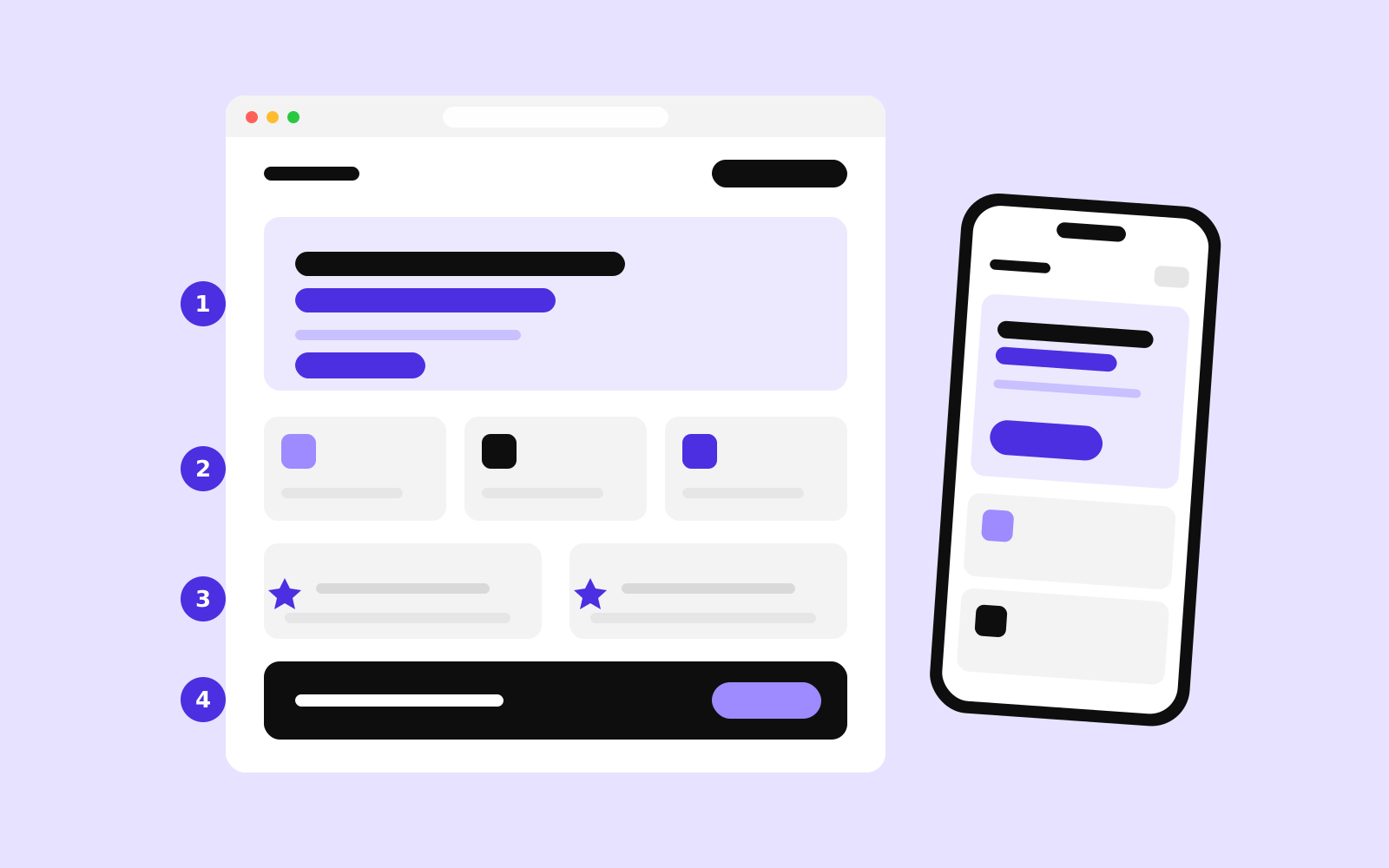
A business homepage needs, roughly in this order: a first screen that says what you do, for whom and how to start; the main paths into your services; proof that you're good at it; how working with you goes; at least a hint of price; the people behind the company; answers to the usual doubts; and the same clear next step again at the end. A footer with real company details closes it. Not every business needs every section, but very few need more.
| Section | Its job | Skip it if… |
|---|---|---|
| First screen | What, for whom, where, how to start | Never |
| Services or paths | Send each visitor to the right page | You do one thing only |
| Proof | Projects, results, reviews, client names | Never; start small if you're new |
| How it works | Remove uncertainty about the process | The process is obvious (a café) |
| Prices | Filter and reassure | Prices truly can't be estimated |
| People | Show who the visitor will deal with | Rarely |
| FAQ | Answer the doubts that stop people | You have a separate FAQ page and link to it |
| Final call to action | Catch the visitor who read to the end | Never |
This is the only part every visitor sees, and on a phone it's small. Research summarised by the Nielsen Norman Group shows that the first 10 seconds decide whether most people stay. In that space you need:
On our own homepage the first screen says what we make (company websites), how fast (live in a few weeks) and what makes the price different (known before we start), with one button to get a price. Everything else waits further down.
Most visitors arrive with one specific need. Give them a short list of what you offer, each with one sentence and a link to its own page, so they can jump to the part that's about them. Three to six items is easier to scan than twelve. If your customers come in very different types (homeowners and property managers, for example), split by customer instead of by service.
Sometimes the most useful thing on the homepage is a tool rather than a list. On the real estate agency site we built, visitors come to look for a property, so searching current listings by location, type and sale or rent is the heart of the site. For the dance school, it's the courses with prices and the weekly schedule. Ask what your visitors came to do, and put that within reach.
Claims cost nothing; proof is what people believe. Show real projects with a photo and one sentence about what was done, a few reviews with names, the logos of clients who allow it, and numbers you can back up. For the electrical engineering contractor we worked with, the site lists more than 260 finished projects. That says more than any adjective could.
If you're new, use what you have: a few early projects described in detail, a review from your first client, your own track record from a previous job. Specific and small beats vague and big.
People hesitate when they don't know what happens after they click. Three to six short steps (“You send a few lines. We call you within a day. You get a fixed quote.”) remove that uncertainty. Add a realistic timeline if you can. It also filters out people who need something you don't do.
You don't have to publish a full price list, but a “from” price, a typical range or the price of a common package answers the question most visitors have and few dare to ask. We show our packages with fixed prices on the homepage, in three currencies, because it saves both sides a call that ends with “that's above our budget”. More on how to present prices in how much does a website cost.
Especially for services, people buy from people. Names, faces and roles of the team, or at least of the person who answers inquiries, make a company feel real. Real photos work better than stock images of handshakes, even if they're not perfect.
Every business gets the same four or five questions before someone commits: How long does it take? Do you work in my area? What if I'm not happy? How do I pay? Answer them briefly on the homepage and link to a full FAQ page if you have one. Every question you answer here is one less reason to go to a competitor who did.
Readers who reach the bottom are the most interested ones. Give them the same next step again, with a sentence about what happens after they click and when they'll hear back. Then a footer with the company name, address, registration details, contact, links to key pages and the privacy policy. It's dull, and it's one of the first places careful buyers check.
Most of the decisions above look different on a small screen. Sections that sit side by side on a desktop stack into one long column, so the order matters even more. Open your homepage on your phone and scroll from top to bottom: does the main button appear without scrolling, can you read the text without zooming, and does every section earn its place in that column?
Then ask someone outside your company to look at the first screen for five seconds, put the phone away and tell you what you do and how they'd get in touch. If they can't, start with the headline. If you'd like a second opinion, our free UX audit looks at your homepage and main pages the way a new customer does, and you get a short written list of what to change first. If your site gets visitors but few inquiries, also read where the leads get lost.
As long as it takes to answer what a new visitor needs to decide, and no longer. For most service businesses that's six to nine sections. Length is rarely the problem; sections that don't help the decision are.
If you can, show at least a starting price or a typical range. It answers the question most visitors have, filters out inquiries that don't fit your budget and reassures the ones that do. A full price list can live on its own page.
Usually not. A slider hides most of its messages behind the first slide and adds loading time. One clear headline and image work better, with the other messages moved into their own sections further down.

Your website has traffic but nobody gets in touch. How to find where the leads get lost: broken forms, the wrong visitors, an unclear offer, no trust and too much friction.
A company website earns its cost when it does a job: answers questions, filters leads, takes bookings. How to plan a site around the work it should do.

Search is changing, AI assistants answer questions directly and visitors are on phones. Our checklist of what a small company website needs in 2026, and what it can do without.